How do you post pictures on this stupid new forum??

Umm, the same way as on the old one lol. I use photobucket so just copy the link. Or click on the insert image button (above the text box) and put in the link.
 
If you go to Reply to thread', click on that when the blank window appears hover cursor above the icons along the top, one towars the right does say Insert Image. Now what I don;t know is how to add the link, I have a brand new photobucket account and have no notion what I do to add pics....
 
I can see no icons, above the blank box is the post title and above that there is User CP, FAQ, Community etc etc!! Sorry Chrissie cant help you with photobucket I upload all mine from facebook!!

Hate this new forum, all posts are jumbled up and uploading pics no longer simple GRRRRR!
 
Last edited:
Mine did it automatically, but you might need to set your posting options to advanced or something. When I click "post reply" at the bottom of the last post I get a text box, and above it is the title and then lots of options, like font, size, colour etc. One of the square ones is insert image.

With regards to photobucket, I clicked on the photo I wanted, and on the left hand side all the links appeared for copying the photos.

Or just put copy the link off the address bar and add and it's counterpart with the /

It's too difficult to explain how to do it properly lol
 
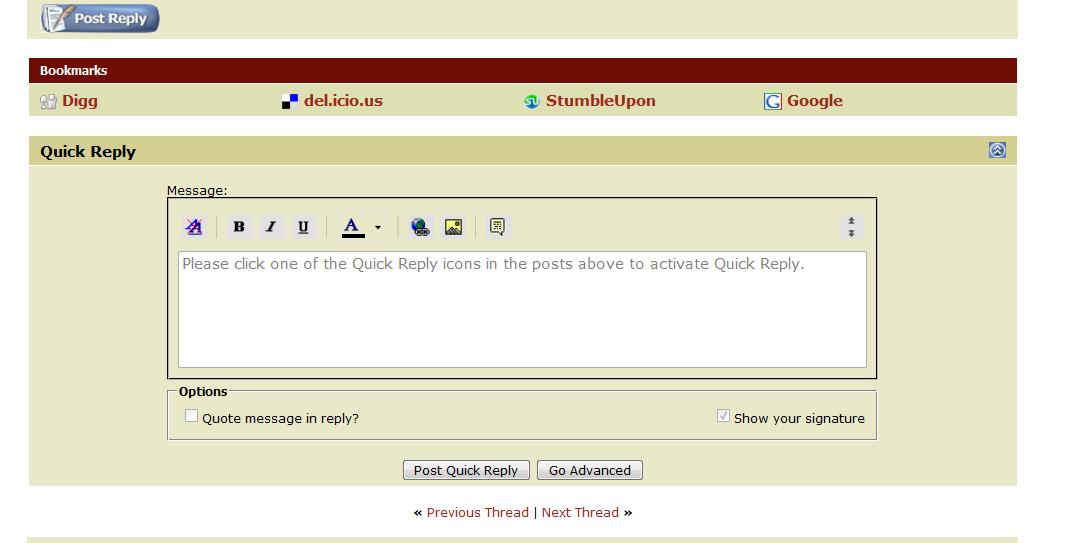
If I'm using the Quick Reply box just below the thread to write my reply, then just above the box, there is a row of symbols, number 2 from right are Insert Image and number 3 from right are Insert Link.

Screenshot :

4491698708_925f18a9d1_o.jpg


Clicking on those symbols will open a little box, where you paste your Image or Link code.


If I click the Post Reply or Go Advanced button, before I begin to write my reply, there will be more symbols to choose between above the box where I write my reply, so then the Insert Image symbol is number 5 from the right and the Insert Link symbol is number 8 from right.


I don't have a Photobucket account, I have a Flickr account (and the only photos of my pets that I have on there are those from my nephew's mobile phone camera), but when I want to get the link code to this or that photo, I just right click on the photo from my Photostream page that I want, a list of options pops up in a little box and I click on the option that says Copy Photoaddress (in direct translation from Swedish, don't know if it says the same on English computers) and then I go back to the HHO tab, put the cursor where I want the photo, click the Insert Image symbol and press Ctrl + V to paste my Flickr link, press the Okay button and the link to my photo, as the screenshot above, appears.


Bitlessbill, just in case, since you didn't use any smileys in your reply and in case you can't "find" them, to get HHO smileys :

Go into User CP towards the top left corner (just above the forum areas) and a Your Control Panel column will turn up,
below Settings & Options go into Edit Options,
scroll down to Miscellaneous Options (the last topic),
after it says Message Editor Interface, there is a box where it might say Basic Editor - A simple text box,
change that to the second option = Standard Editor - Extra formatting controls.
Then click the button Save Changes.

When you return to the forum, if you click the Post Reply button to write your next reply (= not using the Quick Reply box), a box of smileys and a few other things will become available, if you do use the Quick Reply box, there will now be a Go Advanced button below the Quick Reply box, press that and a box with smileys and the few other things will become available.


I hope this helped somebody.

:)
 
Thanks for your help!! But I dont have them icons :(!! This is so frustrating!! I have tried quick rely and advanced but all I got on either is a blank txt box and at the bottom my smileys!!! Anyone got any ideas?
 
I know what you mean about not seeing the boxes!!!!

The way I have done it is longer but it works....

U upload the pics onto the interweb, get the code bit from the properties bit, go into the box that you write in on here and write


Then its done!
 
a015.gif


Since you have smileys and the Go Advanced button, I presume that you have changed that thing in Edit Options to Standard Editor - Extra formatting controls, that I wrote about to Bitlessbill, so I can only suggest that you try and log out from HHO and then log in again, just remember to tick the Remember Me box before you log in.
Because when I log out, I get a message saying that all my HHO cookies have been cleared and when I then log in again, my problems have sometimes been fixed.

If logging out and back in again doesn't help, try posting in Suggestions and Feedback, saying that you've changed your setting in the Edit Options to get smileys and that you've cleared your HHO cookies, but you''re still not getting any Insert Image icon etc.

I was going to suggest that, if you do need to ask for Admins help, you tried doing a screenshot of how your reply page looks, with the smileys at the bottom, and added the screenshot to your post to Admin, but then I realised that since you can't post photos, that would not be the smartest suggestion.
Ashamed_Emote_by_budgieishere.gif


But perhaps if you have a Photobucket or Flickr account and you add a screenshot to your account, I can post it for you if you give me a link to it?

:confused:
 
Bitlessbill, just in case, since you didn't use any smileys in your reply and in case you can't "find" them, to get HHO smileys :

Go into User CP towards the top left corner (just above the forum areas) and a Your Control Panel column will turn up,
below Settings & Options go into Edit Options,
scroll down to Miscellaneous Options (the last topic),
after it says Message Editor Interface, there is a box where it might say Basic Editor - A simple text box,
change that to the second option = Standard Editor - Extra formatting controls.
Then click the button Save Changes.

When you return to the forum, if you click the Post Reply button to write your next reply (= not using the Quick Reply box), a box of smileys and a few other things will become available, if you do use the Quick Reply box, there will now be a Go Advanced button below the Quick Reply box, press that and a box with smileys and the few other things will become available.


I hope this helped somebody.

:)

I just did that and now I have the boxes to make it easier, so to the OP...just do what they said ^^^^^^^^^^^^^^^^^^^^^^

Thanks,

Vicki :)
 
Top