eahotson
Well-Known Member
Can someone guide me?Do I need a resizing tool?If so which one is the best for a simpleton?Thanks.


Thanks.Is this for posting onto HHO?
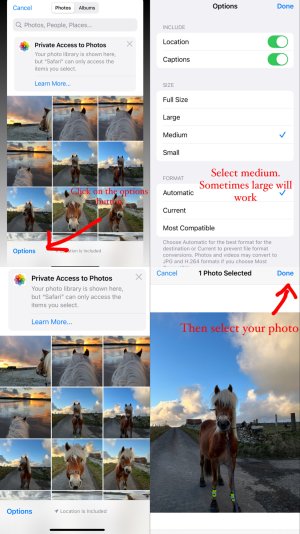
If so, click through as far as your photo library, then if using an iPhone click on “options” (bottom left). I usually change it to medium. I’m afraid I don’t know on an android
Thanks but I have android.


That's what I use too.I use the lit photo app so easy
I will look out for it.That's what I use too.

I have an iPhone but I can’t see my photos in this view, I’ve no idea why, I can only edit and resize mine in another app! I use Lightroom which is free but this would be much easier!
It’s so easy on a Samsung, I miss mine! iPhone it seems so much harder!On my Samsung Galaxy:
Open gallery.
Select the photo.
Click on the little pencil icon at the bottom.
Click on the 3 dots in the right hand corner.
Click resize.
Click 20% and save.
Will try.On my Samsung Galaxy:
Open gallery.
Select the photo.
Click on the little pencil icon at the bottom.
Click on the 3 dots in the right hand corner.
Click resize.
Click 20% and save.
I have an iPhone but I can’t see my photos in this view, I’ve no idea why, I can only edit and resize mine in another app! I use Lightroom which is free but this would be much easier!
Do you just go to your photos and select which album?
Thank you.Yeah that’s right. Just go to the insert button on the forum and then pick library and the list of your photos should come up. On the bottom left corner there should be an option button where you choose the size. I change the size before picking my photos.
You might need to set your photo library to “allow all” photos to be shared to safari if your whole photo library doesn’t come up.


That’s what I do! Easy!Is this for posting onto HHO?
If so, click through as far as your photo library, then if using an iPhone click on “options” (bottom left). I usually change it to medium. I’m afraid I don’t know on an android


I use lit photo sometimes, but I find the interface to Photo Resizer easier.I use the lit photo app so easy